ssh
- Progress: Done
Console port security
Concepts
Key points
- By default, no password is needed to access the CLI of a Cisco IOS device via the console port
- Can configure a password on the console line
- Have to enter a password to access the CLI via the console port
- Can configure the console line to require users to login using one the configured usernames on the device
Implementation
Simple login
line console 0
password ccna
login
end
exit
Login local
username jeremy secret ccnp
line console 0
login local
end
exit
IP management
Concepts
Key points
- Layer 2 switches do not perform packer routing and do not build a routing table. They are not IP routing aware
- Can assign an IP address to an Switch Virtual Interface (SVI) to allow remote connections to the CLI of the switch (using Telnet or SSH)
Implementation

SVI configuration
interface vlan1
ip address 192.168.1.253 255.255.255.0
no shutdown
exit
ip default-gateway 192.168.1.254
- Configure the switch's default gateway
- PC2 is not in the same LAN as SW1
- If SW1 does not have a default gateway, it cannot communicate with PC2
Telnet
Concepts
Key points
- A protocol used to remotely access the CLI of a remote host
- Developed in 1969
- Largely replaced by SSH, which is more secure
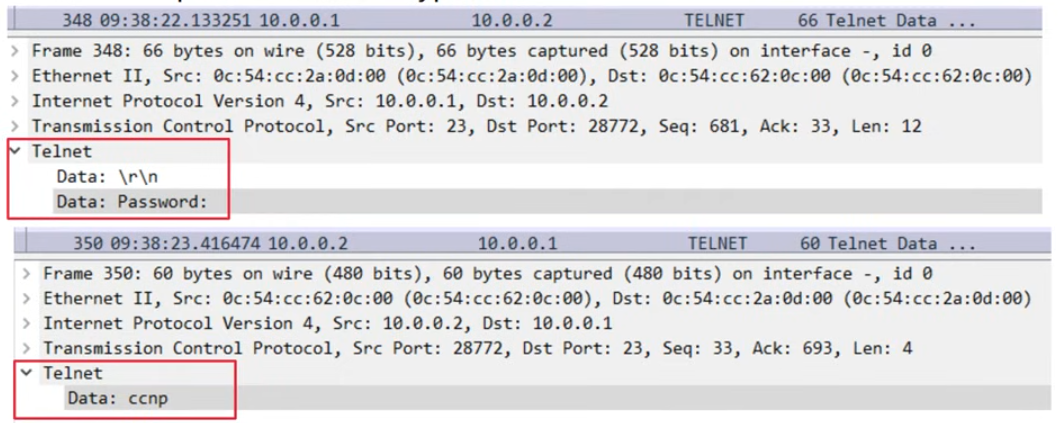
- Sends data in plain text. No encryption
- Port 23
Implementation
Step-by-step guide
enable secret ccna
username jeremy secret ccna
access-list 1 permit host 192.168.2.1
line vty 0 15
login local
exec-timeout 5 0
transport input telnet
access-class 1 in
telnet 192.168.1.253
SSH
Concepts
Key points
- SSH (Secure Shell) was developed in 1995 to replace less secure protocols like Telnet
- SSHv2, a major revision of SSHv1, was released in 2006
- If a device supports both v1 and v2, it is said to run version 1.99
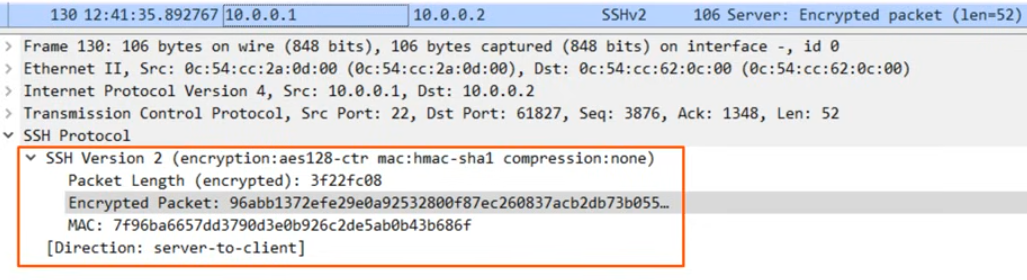
- Provides security features such as data encryption and authentication
- Port 22
RSA
- To enable and use SSH, you must generate an RSA public and private key pair
- The keys are used for data encryption/decryption, authentication, etc.
- Greater key lengths are more secure, but take longer to generate and use
Prerequisites
Check
show version
show ip ssh
- Cisco exports NPE (No Payload Encryption) IOS images to countries that have restrictions on encryption technologies
- NPE IOS images do not support cryptogaphic features such as SSH
Generate RSA
ip domain name jeremysitlab.com
crypto key generate rsa
do show ip ssh
Implementation
Step-by-step logic
- Configure host name
- Configure DNS domain name
- Generate RSA key pair
- Configure enable password, username/password
- Enable SSHv2
- Configure VTY lines
- Connect:
ssh -l username ip-addressorssh username@ip-address
Step-by-step guide
enable secret ccna
username jeremy secret ccna
access-list 1 permit host 192.168.2.1
ip ssh version 2
line vty 0 15
login local
exec-timeout 5 0
transport input ssh
access-class 1 in